Track job applications and recruiter replies automatically
HireProgress gives you a personal email address to use when applying for jobs. Recruiter replies sent to that address can become tracked applications in your dashboard, keeping the conversation and the role together.
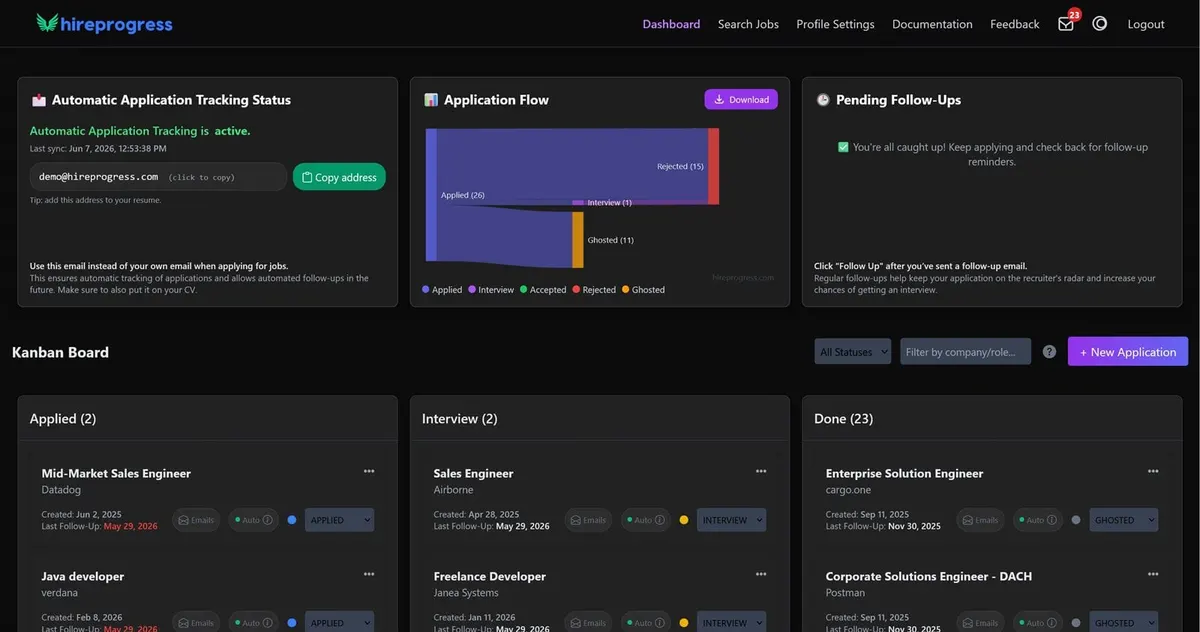
How the tracking email works
- Set up your account and personal HireProgress address. Automatic recruiter reply tracking is a Pro feature. Check the pricing page for the current trial and plan details.
- Use that address on new applications. This routes recruiter replies to your HireProgress mailbox. Keep track of roles before a reply arrives by adding them manually.
- Review replies and your application board. Keep messages attached to the role, check the stage and decide on the next action.
- Bring in your existing pipeline. Pro users can import a CSV and map job title, company, job URL and status. Review the preview before confirming.
Example: one role, one place to find the conversation
Imagine applying for a developer role using your HireProgress email. When a recruiter sends an interview request to that address, you can review the message alongside the tracked application rather than reconstructing the history from a spreadsheet and a separate inbox. Check the application stage and keep the next follow-up visible.
This is an illustrative workflow, not a claim about how quickly employers reply or whether you will receive an interview.
What should I know before starting?
- Automatic tracking depends on replies reaching your HireProgress address. Applications sent with another address do not automatically move their existing conversations here.
- Free includes manual tracking and follow-up reminders. Personal tracking email, automatic replies tracking and bulk import are Pro features.
- A tracker helps organize the process; it does not apply for jobs or guarantee recruiter responses.
- Review tracked details and stages. You can add applications manually and keep control over your board.
Spreadsheet or automatic job application tracker?
A spreadsheet is useful when you want custom columns and are happy to update every reply. A dedicated tracker is useful when the application list and recruiter conversations become difficult to manage separately. Try the free spreadsheet template first if you are still working out your process.